
Home · Platforms · eBay · UPC-A
eBay UPC and Product Identifier Requirements: How to Add Them and Fix Missing Errors
eBay's catalog-based listings need a product identifier (UPC, EAN, or ISBN). Listings with valid identifiers get a Best Match search boost, are eligible for Product Reviews, and consolidate onto the canonical product page where buyers compare offers.
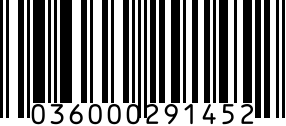
UPC-A is the default for new and used commercial products in North America. EAN-13 elsewhere. ISBN for books.
Step by step
- 1
Generate your UPC-A
Use the generator above for valid 12-digit codes with proper check digit.
- 2
Open Sell Your Item form on eBay
List an item > pick the category > scroll to Product Identifiers section.
- 3
Select UPC and paste the code
Or enter 'Does Not Apply' if no UPC exists (commonly for used, custom, or one-of-a-kind items).
- 4
Match to eBay's catalog
If the UPC matches an existing catalog entry, eBay auto-fills title, image, specs. You can override or accept.
- 5
Publish
Listing goes live with eBay catalog linkage. Product Reviews show alongside your offer.
Gotchas
- If you enter 'Does Not Apply', the listing loses Best Match boost. Only use for genuinely unidentifiable items.
- Reused UPCs (same code, different products) get flagged — eBay's catalog dedup is strict.
- For multi-variant listings (size, color), eBay requires unique UPCs per variant.
FAQ
Do I need a UPC for every eBay listing?
No, but listings without one rank lower in Best Match and miss out on Product Reviews. For commercial products, always add one.
Can I list internationally on eBay with a UPC-A?
Yes — eBay accepts UPC-A globally and most international scanners treat it as an EAN-13 with leading zero. For EU markets, EAN-13 looks more native on packaging.
Related
- UPC-A generator — standalone generator without eBay steps.
- All eBay barcode guides
- All platforms