
Home · Barcode types · FNSKU
Générateur d'étiquette FNSKU gratuit : codes-barres Amazon FBA pour prestataires et auto-expéditeurs
Le FNSKU (Fulfillment Network Stock Keeping Unit) est l'identifiant par unité d'Amazon pour l'inventaire FBA. Chaque unité envoyée à un centre de distribution Amazon doit porter une étiquette FNSKU pour qu'Amazon l'achemine correctement, même mélangée à des unités du même ASIN d'autres vendeurs.
Validator
Paste an existing FNSKU into the field above. We compute the check digit if you provide just the payload, verify it if you provide the full code, and refuse to render if the check digit is wrong — so anything that renders here is guaranteed to scan.
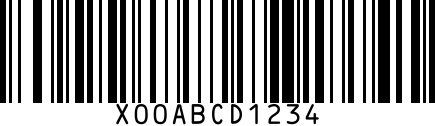
Amazon émet les FNSKU depuis Seller Central — ils commencent toujours par « X00 » et font 10 caractères. Utilisez cette page pour rendre un FNSKU attribué en code-barres scannable au format prestataire standard 1×2 po, ou cliquez sur Aléatoire pour tester le format.
Structure
10 caractères alphanumériques : préfixe « X00 » suivi de 7 lettres majuscules et chiffres aléatoires. Rendu en code-barres Code 128, avec le texte FNSKU imprimé sous les barres.
When to use FNSKU
- Chaque unité envoyée à Amazon FBA (pas seulement la caisse maître — chaque unité individuelle)
- Flux prestataire lors de l'externalisation de l'étiquetage FBA
- Réimpression d'étiquettes FNSKU endommagées ou manquantes côté vendeur
- Test des logiciels/configurations d'imprimante d'étiquettes FBA avant la production
Where it's required
- Tout l'inventaire FBA par défaut. L'inscription au Brand Registry peut autoriser l'inventaire mélangé sans étiquette dans certaines catégories, mais la plupart des vendeurs utilisent des FNSKU étiquetés.
- Requis sur l'unité, distinct de tout UPC imprimé par le fabricant sur l'emballage de vente.
FAQ
Qu'est-ce qu'une étiquette FNSKU ?
FNSKU signifie Fulfillment Network Stock Keeping Unit. C'est un code-barres Code 128 unique (commençant par « X00 ») qu'Amazon attribue à chacune de vos références FBA. Chaque unité envoyée à un centre Amazon doit porter une étiquette FNSKU pour relier l'inventaire à votre compte vendeur, distinguant vos unités de produits identiques d'autres vendeurs.
SKU et FNSKU sont-ils identiques ?
Non. Un SKU est votre code produit interne — vous en définissez le format ; il est privé. Un FNSKU est le code-barres Amazon pour votre produit dans ses centres — Amazon le génère, le format est fixe (préfixe X00 + 7 caractères). Chaque SKU a exactement un FNSKU.
Où trouver les étiquettes FNSKU ?
Dans Seller Central : Inventaire → Gérer l'inventaire → trouvez votre SKU → menu d'action → « Imprimer les étiquettes d'articles ». Choisissez taille et quantité, téléchargez en PDF, imprimez sur étiquettes amovibles 1×2 po. Le PDF contient votre FNSKU en Code 128 plus le texte lisible en dessous.
ASIN et FNSKU sont-ils identiques ?
Non. L'ASIN identifie la fiche produit dans le catalogue Amazon (visible des acheteurs). Le FNSKU identifie quelle unité physique appartient à quel vendeur dans les centres Amazon (usage en coulisses). Un ASIN peut avoir plusieurs FNSKU de vendeurs différents proposant le même produit.
Comment obtenir une étiquette FNSKU ?
Connectez-vous à Seller Central → Inventaire → Gérer l'inventaire → trouvez votre SKU FBA → menu d'action → « Imprimer les étiquettes d'articles » → choisissez quantité et format → téléchargez le PDF. Depuis janvier 2026, Amazon n'appose plus les étiquettes FNSKU pour vous — vous devez les apposer avant expédition vers FBA.
Quelle taille pour l'étiquette FNSKU ?
Spécification Amazon : étiquette amovible 1×2 po (25×51 mm), encre noire sur surface blanche non réfléchissante. Apposez-la à plat sur tout code-barres fabricant existant (UPC, EAN) pour éviter que le scanner du centre ne lise le mauvais code.