
Home · Platforms · Shopify · EAN-13
EAN-13 Barcodes for Shopify: International Selling, Google Shopping EU & Meta Commerce
EAN-13 is the 13-digit international product barcode used everywhere outside North America. For Shopify stores selling in Europe, UK, Australia, Asia, or Latin America, EAN-13 is the expected identifier in the Barcode field — Google Shopping localized for those regions, Meta Commerce, and most international marketplaces.
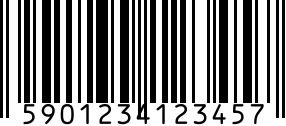
If you only sell in the US/Canada, UPC-A is fine. For multi-region stores, EAN-13 is the cleaner default since it works everywhere (a UPC-A is just an EAN-13 with a leading zero anyway).
Step by step
- 1
Generate the EAN-13
Use the generator above. For real listings, purchase EAN-13s registered to your brand at GS1.
- 2
Open the product in Shopify admin
Products > [your product] > Inventory section > Barcode field.
- 3
Paste the 13-digit code
One per variant. Save the product.
- 4
Confirm your locale's Sales Channels
Google Shopping UK / DE / FR, Meta Commerce (Europe), Amazon EU integration — all will now pick up the EAN-13.
Gotchas
- EAN-13 country prefixes show GS1 membership, not manufacturing location. A '590' prefix means the brand registered in Poland, regardless of where the product is made.
- ISBN is technically EAN-13 (starts with 978/979). If you're selling books, use the ISBN generator instead.
- Google Shopping EU does GS1 validation. Verified GS1-derived EANs work for standard listings; brand-registered products need codes licensed in the brand's own name.
FAQ
Can I use a UPC-A instead of EAN-13 for international Shopify?
Technically yes — most international scanners accept UPC-A as an EAN-13 with leading zero. But EU consumers expect a 13-digit code on packaging and Google Shopping EU is stricter about it.
Where do I buy real EAN-13s?
For standard marketplace listings, get verified GS1-derived EAN-13s from our Buy UPC Codes page (from $5). Brand-registered sellers need codes licensed in their own name through their local GS1 member organization (GS1 UK, GS1 Germany, GS1 Italy, etc. — same organization, different national branches).
Related
- EAN-13 generator — standalone generator without Shopify steps.
- All Shopify barcode guides
- All platforms