Home · Learn · How to Scan a Barcode or QR Code with Your Phone

How to Scan a Barcode or QR Code with Your Phone

Your phone is already a barcode scanner. Here is the practical guide for iPhone and Android — what works natively, what needs an app, and why some scans fail.

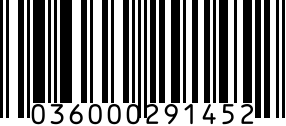
UPC-A example

Most people don't realize their phone already scans most barcode formats — no app needed. iPhone has scanned QR Codes natively since iOS 11 (released 2017); Android added native QR scanning via Google Lens in 2020. The major exception: 1D retail barcodes (UPC, EAN, Code 128) work on the iPhone Camera app since iOS 17 but require a dedicated app on most Android phones. Here is the comprehensive guide.

Quick orientation: this is an educational page explaining how phone scanning works. We are a barcode GENERATOR (we let you CREATE barcodes), not a scanner. If you're trying to make a UPC or QR Code, use our generator at upcgen.com/. If you're trying to read one, keep reading.

How to scan a QR Code with an iPhone

iOS 11 and later: open the Camera app (the stock one, not a third-party camera), point at the QR Code, hold steady for about 1 second. A yellow notification banner appears at the top with the QR's content (URL, text, vCard, Wi-Fi credentials). Tap the banner to open the link or take action. No need to take a photo — the camera detects the code in the live viewfinder. Also works in the Code Scanner widget (swipe down from top-right, tap the QR icon) for explicit scanning. Works on iPhone 6s and newer. If nothing happens: Settings → Camera → enable 'Scan QR Codes'.

How to scan a QR Code with an Android phone

Three paths. (1) Stock Camera app on Pixel, Samsung Galaxy (Android 11+), and most modern Androids — open Camera, point at the code, a popup appears with the URL. (2) Google Lens — open the Google app, tap the camera icon in the search bar, point at the code. Works on any Android since 2020. (3) Samsung Galaxy specific: swipe down twice for Quick Panel, tap the QR scanner icon. If your stock Camera doesn't detect QR codes, install Google Lens (free from Play Store) — it works on any Android 7.0+.

How to scan a 1D barcode (UPC, EAN, Code 128, ISBN) with your phone

1D barcodes are trickier. iPhone Camera app since iOS 17 (Sep 2023) auto-detects UPC and EAN barcodes — just like QR. On older iOS or any Android, install a dedicated scanning app: Scanbot, Cognex, ScanLife, or any of the major retail scanner apps. For product lookup specifically (find what something is from its UPC), use the Amazon app's camera search, Walmart app barcode scanner, or Google Shopping. For ISBN book lookup, use the Goodreads or LibraryThing app.

When the camera scan fails — 5 reasons

(1) Quiet zone too small — most barcodes need a white margin (10x the bar width) around them; cropping kills scans. (2) Low contrast — printed on colored paper, faded, or photographed under yellow light. (3) Out of focus — phones need a sharp image; macro mode helps on iPhone 13 Pro+. (4) Wrong format — your stock camera reads QR but not UPC. Install Scanbot or use Google Lens. (5) Damaged code — torn, partly missing, water-damaged. 2D codes (QR, Data Matrix, Aztec) survive damage better than 1D thanks to Reed-Solomon error correction (~30% of the code can be missing and still scan).

When you need a real hardware scanner

Three scenarios where phone scanning isn't fast enough. (1) Warehouse receiving and picking — Zebra TC52/TC57 handheld terminals scan 200+ barcodes per minute, sustained for 8-hour shifts. Phones can't keep up. (2) Retail point-of-sale — laser or imager fixed scanners (Honeywell, Datalogic) scan in <0.1s consistently, faster than a phone's autofocus. (3) Industrial 2D — barcodes printed on circuit boards or pharmaceutical vials need dedicated fixed-mount imagers (Cognex DataMan) with auto-trigger and ring lighting. For low-volume use (under 100 scans/day), a phone is fine and saves you $500-$3,000 per device.

Online barcode scanners (webcam-based)

Several websites offer webcam-based barcode scanning — point your laptop's webcam at the barcode and the page decodes it. Useful for sporadic scans without installing an app. Examples: webqr.com (QR only), barcodelookup.com, scanbarcode.app. Caveat: webcam recognition quality depends on lighting and webcam resolution; modern phones outperform laptop webcams for scanning. Privacy note: the scan typically runs entirely client-side (JavaScript in your browser) but reputable services don't transmit images to servers — check the site's privacy policy before scanning anything sensitive.

FAQ

How do I scan a QR code with my iPhone?

Open the stock Camera app (not a third-party camera), point at the QR Code, hold for 1 second. A yellow notification banner appears at the top with the QR's content — tap it to open the link or take action. Works on iPhone 6s and newer with iOS 11 or later. If nothing happens, check Settings → Camera → enable 'Scan QR Codes'.

Can my phone scan barcodes without an app?

QR codes: yes, on every modern iPhone (iOS 11+) and most Androids (Pixel, Galaxy, Android 11+). 1D retail barcodes (UPC, EAN): yes on iPhone since iOS 17, but most Androids still need a free third-party app (Scanbot, Google Lens, ScanLife). Data Matrix, Aztec, PDF417: dedicated app needed on both iOS and Android — stock cameras don't auto-detect these niche formats.

Why isn't my phone scanning the barcode?

Five common reasons. (1) Insufficient quiet zone (white margin) around the barcode. (2) Low contrast — faded, colored, or poorly-lit. (3) Out of focus — try moving closer, or tap to focus. (4) Wrong format — your stock camera might read QR but not UPC; try Google Lens or Scanbot. (5) Damaged or partly obscured code — 1D barcodes fail completely with even minor damage; 2D codes are more forgiving thanks to error correction.

How do I scan a barcode online?

Several free websites offer webcam-based barcode scanning — they use your laptop's webcam to read the barcode and decode it. Search 'online barcode scanner' for current options. The scan typically runs client-side in JavaScript (no image upload), but check the site's privacy policy first if scanning sensitive codes. Webcam quality matters — phones outperform laptop webcams for barcode reading.

Is there a free barcode scanner app?

Many. On iOS: stock Camera app (free, built-in, scans QR + UPC). On Android: Google Lens (free, built-in on most phones). Third-party free apps: Scanbot (iOS/Android), ScanLife, QR Code Reader by Scan, ZBar. Avoid apps that require excessive permissions or show ads on top of scan results — the legitimate free scanners need only camera access.

What is the difference between a barcode scanner and a QR code scanner?

QR Code is one specific 2D barcode format. A 'QR code scanner' typically reads only QR codes. A 'barcode scanner' is broader — reads 1D codes (UPC, EAN, Code 128, Code 39, ITF-14, ISBN) plus 2D codes (QR, Data Matrix, Aztec, PDF417). Most modern phone scanning apps handle both. The iPhone Camera app reads QR + UPC + EAN natively but not most other 2D formats.

Can I scan a barcode without internet?

Yes for the SCAN itself — decoding happens locally on your phone (no internet needed). The internet only matters AFTER the scan, depending on what the barcode contains. A QR code containing a URL needs internet to open the URL. A UPC scan in the Amazon app needs internet to look up the product. Pure scan-and-display (showing you the raw barcode value) works fully offline on any modern phone.

Related generators

Need a real barcode now?

Generate a valid UPC-A barcode in seconds — no signup, no watermark. Free for casual use; paid plans from $9/mo for higher volume.

Related topics